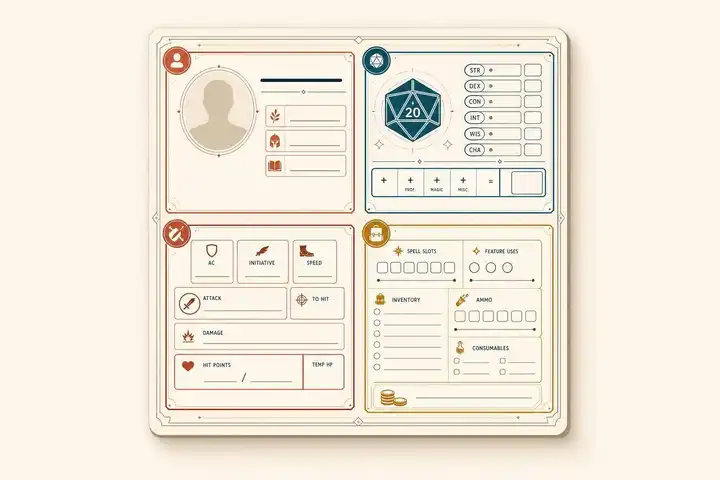
A character sheet is not just a list of stats. It’s the page you check to make choices fast. In most games, the fields you use most are combat numbers, roll bonuses, and limited-use resources. In D&D 5e, that often means AC, HP, attacks, spell DC, and saves. In Pathfinder, it also means Fortitude, Reflex, Will, and class resources. In Call of Cthulhu, you watch skills, Sanity, and Magic Points closely.
Here’s the short version:
- Identity fields tell me who the character is: name, class, level, species, and background
- Roll fields tell me what to add or what target to use
- Combat fields track what changes round by round
- Resource fields show what I’ve spent and what I have left
- Notes fields help me remember NPCs, hooks, gear, and short rules text
A few common mistakes slow players down more than anything else:
- Using the ability score instead of the modifier
- Re-doing math that is already written on the sheet
- Forgetting to track uses, ammo, conditions, or duration
- Writing full rule text instead of short play notes
- Leaving weapon, spell, and feature lines half-finished before play starts
Across these systems, the layout changes, but the job stays close to the same. D&D and Pathfinder put combat first because those games use a lot of rolls in fights. Call of Cthulhu gives more room to percentile skills, SAN, and investigator details because stress, mystery, and social context matter more there.

TTRPG Character Sheet Comparison: D&D 5e vs Pathfinder 2e vs Call of Cthulhu 7e
Quick comparison
| System | Main roll style | Fields I check most | Common slip-up |
|---|---|---|---|
| D&D 5e | d20 + bonus | AC, HP, saves, attacks, spell slots | Using score instead of modifier |
| Pathfinder | d20 + total bonus | AC, HP, saves, actions, class resources | Forgetting total bonuses are pre-added |
| Call of Cthulhu 7e | d100 under target | Skills, SAN, MP, Dodge | Forgetting low rolls are good |
The main point: every field should help me make a table decision in seconds. If a box doesn’t help with a roll, a resource, or a roleplay choice, it should stay short and easy to scan.
Identity, Background, and Roleplay Fields
Name, Class, Level, Species, and Background
Class is one of the most important parts of the sheet from a rules standpoint. It shapes your main features, starting equipment, and the ability scores that matter most for your build. A Barbarian gets rage and other damage-focused class features, while a Bard begins with instruments and spells.
Level shows how far your character has progressed and unlocks new abilities. In some games, it’s also tied to XP.
Species or race adds another rules layer through stat bonuses, movement speed, and traits like Darkvision or resistances. A Dragonborn’s breath weapon or a Dwarf’s poison resistance can affect play just as much as any story note.
Background is where rules and story come together. It often gives you skill proficiencies along with a story hook that explains why those skills make sense for the character. D&D 5e lays this out in a very clear way:
| Background | Story Hook | Mechanical Benefit |
|---|---|---|
| Acolyte | Monastic upbringing; spent time in a temple | Insight, Religion, and two languages |
| Urchin | Grew up on the streets | Sleight of Hand, Stealth, and two tool proficiencies |
| Sage | Studied books and ancient lore | Arcana, History, and two languages |
| Soldier | Served in an army or militia | Athletics, Intimidation, and two tool proficiencies |
A background can work with any class. It explains who the character is, not just how the build works.
Traits, Ideals, Bonds, Flaws, and Investigator Details
Personality fields help you make choices in play. Your character’s values, quirks, social habits, and personal hang-ups should guide what they do during moral decisions, social scenes, and other tense moments. A flaw is most useful when it creates friction at the table, not when it just sits on the sheet like a label.
Other games use different terms, but the purpose stays the same. These fields show how the character fits into the world and what that means once play starts. In Call of Cthulhu, details like occupation, age, and residence help shape the kinds of social scenes your investigator can enter and the resources or information networks they can reasonably reach. They also make it easier to connect the character to specific NPCs and locations the GM can turn into hooks.
Stats, Skills, and Saves: The Numbers You Roll Most Often
Once you know who your character is, the next job is reading the numbers that run play.
Ability Scores, Modifiers, and Characteristics
In D&D 5e and Pathfinder, the score sets the stat, but the modifier is the number you usually add to a roll. So if your Strength is 16, your modifier is +3. That +3 is what goes on the d20 roll.
Call of Cthulhu works in a different way. It uses percentile checks, which means you roll d100 and try to get under the target number. A Hard success is half the target number. An Extreme success is one-fifth.
How to Read Skills and Saving Throws Without Math Errors
After ability scores, the next numbers to look at are the rolls built from them: skills and saves.
The mistake people make most often is simple: they use the score instead of the modifier. A 14 Intelligence means +2, not 14.
Saving throws work the same way. In D&D 5e, there are six saving throws, one for each ability score. In Pathfinder 2e, saves are Fortitude, Reflex, and Will. Use the total written on the sheet. It already includes ability, proficiency, and other bonuses, so you don't need to stop and recalculate in the middle of your turn.
Roll Fields Compared Across D&D, Pathfinder, and Call of Cthulhu
The same basic idea shows up a bit differently in each system.
| Game System | Core Stats | Skill System | Defensive Rolls | Roll Callout |
|---|---|---|---|---|
| D&D 5e | 6 Ability Scores (1–20) | Based on ability scores; proficiency adds a flat bonus | 6 Saving Throws (one per ability) | d20 + modifier + proficiency |
| Pathfinder 2e | 6 Ability Scores (1–20) | Five proficiency tiers (Untrained to Legendary) | Fortitude, Reflex, Will | d20 + total bonus |
| Call of Cthulhu 7e | 8 Characteristics (percentile) | Independent percentile scores | Dodge skill or characteristic checks | d100 under target number |
D&D and Pathfinder want high rolls. Call of Cthulhu wants low rolls. If you switch systems and flip that in your head, you'll trip over it fast.
Combat Fields and Resource Tracking
After stats and saves, the next part to watch is your combat section. These are the numbers and notes that change during a fight, often every round.
Armor Class, Initiative, Speed, Hit Points, and Attacks
Armor Class (AC) is the number an enemy has to beat to hit you. It usually starts at 10, then adds armor, Dexterity, and other bonuses. In Pathfinder 1e, you may also track standard, touch, and flat-footed AC.
Initiative is rolled once at the start of combat and sets the turn order. Speed shows how far you can move on your turn, which helps you tell right away if you can reach a target or if you need to spend your move getting closer. For Hit Points, put current and maximum values side by side so your status is easy to spot. Attack fields should show the total bonus for each weapon.
Fill in your weapon lines before the session starts. That way, when your turn comes up, you’re not doing math on the fly.
Once those combat numbers are ready, the next job is tracking the resources that get spent during play.
Sanity, Magic Points, Conditions, and Other Tracked Resources
In Call of Cthulhu, Sanity (SAN) and Magic Points (MP) are two of the main numbers to watch. Read them the same way you read HP and AC, so you can see your situation fast when a choice matters. Sanity drops when your investigator runs into something horrifying, and Magic Points power spells and rituals. Update both as they change.
Most games also ask you to track conditions and other status effects. A short note field next to HP works well, or you can use a separate conditions box if your sheet has one. If an effect lasts for a set time, write down the duration too. That saves you from wondering three rounds later if the effect is still active.
For Pathfinder resources like Ki, Lay on Hands, Panache, or Channel Energy, write the maximum once and track the current amount during play. Those maximums are often based on a formula, such as half your level plus an ability modifier.
Resource Tracking Layouts Compared
Different resources work better with different layouts. A good setup makes updates fast and keeps small things from slipping through the cracks.
| Resource Type | Best Tracking Layout | Why It Works |
|---|---|---|
| Hit Points / Sanity | Current/Max number boxes | Frequent updates; easy to scan at a glance |
| Spell Slots / Ki / Lay on Hands | Segmented checkboxes | Fast to mark off limited uses |
| Conditions / Status Effects | Short note field with duration | Captures the effect and when it ends |
| Temporary Buffs | Toggle or checkbox next to the stat | Reminds you when a modifier is active |
| Ammunition / Consumables | Quantity counter in inventory | Keeps limited items from getting lost |
Abilities, Spells, Inventory, Notes, and Final Takeaways
Class Features, Feats, Spells, and Equipment
Abilities can slow the game down when your sheet buries the parts you need. The fix is simple: write down only what you use at the table.
For each class feature or feat, note the action cost, uses per rest, and the effect in plain shorthand. If the feature scales, write the formula instead of a fixed number. For example, a resource pool might read "1/2 Paladin level + Charisma modifier" so you can update it fast when you level up.
Use that same shorthand style for spells and gear. When every part of the sheet follows the same pattern, it gets much easier to scan in the middle of play.
Spells need a few fields if you want them to be useful in combat: save DC, range/distance, casting time, and a one-line effect summary. Pre-calculate your spell save DC and spell attack bonus from your casting ability score so you aren't doing extra math during a fight. Group spells by level, and label them based on how the class casts them.
For equipment, record name, count, weight, value, and where it's stored. That last part matters more than people think. It tells you whether an item is carried, worn, stowed, or stored. Keep money in separate columns for Gold, Silver, and Copper. In many fantasy systems, 1 Gold = 10 Silver = 100 Copper.
| Ability/Spell Field | Essential Data to Record | Purpose |
|---|---|---|
| Class Feature | Action cost, uses per rest, scaling formula | Quick combat execution |
| Feat/Talent | Modifiers to-hit/damage, prerequisites | Avoid math errors |
| Spell | Save DC, range, casting time, effect shorthand | Reduce rulebook flipping |
| Equipment | Weight, value, location, enhancement bonus | Encumbrance and utility tracking |
Campaign Notes and NPCs
Once combat stats and gear are in place, notes become your last fast-reference tool.
Keep a short tracker for each NPC with their name, relationship, and current status. That's usually enough to stay on top of social scenes and remember callbacks from earlier sessions.
Conclusion: The Fields That Matter Most and How to Use Them
A character sheet works best when every field has one clear job. Use core numbers for the rolls you make most often. Build things like AC and spell DC from those numbers. Track HP and limited-use abilities as they change. Write features and spells in shorthand you can read in a few seconds. And treat notes and relationship trackers as tools for choices, not decoration.
Once the sheet helps you make fast calls, readability becomes the last piece. Use shorthand, track changes, and make sure every field helps with a table decision.
FAQs
How should I set up my sheet before a session?
Before a session, define your character’s concept, ancestry, and background. Then assign attributes and skill ranks so they match your character’s story and what you want them to do at the table.
Fill in key stats like hit points, armor class, and saving throws. Choose your gear, spells, or abilities, and jot down roleplay hooks like flaws, habits, or goals. It also helps to keep a quick-reference guide for core rules or common actions nearby so you can stay organized and keep the game moving.
Which fields matter most during combat?
During combat, keep your eyes on the parts of your sheet that affect whether you stay standing, when you act, and what you can do: current hit points, armor class or defense values, initiative modifiers, and your action economy.
You’ll also want your weapons, damage, active conditions, and limited-use combat abilities or spells right at your fingertips. Those are the tools that shape your choices each round.
What’s the fastest way to track limited-use abilities?
Add dedicated resource trackers to your character sheet. If you use a paper sheet, put checkboxes or small circles next to the ability name so you can mark each use during play.
If you use a digital tool, lean on built-in counters or buttons. It also helps to keep these features separate from story notes, so you can check your remaining uses at a glance.


